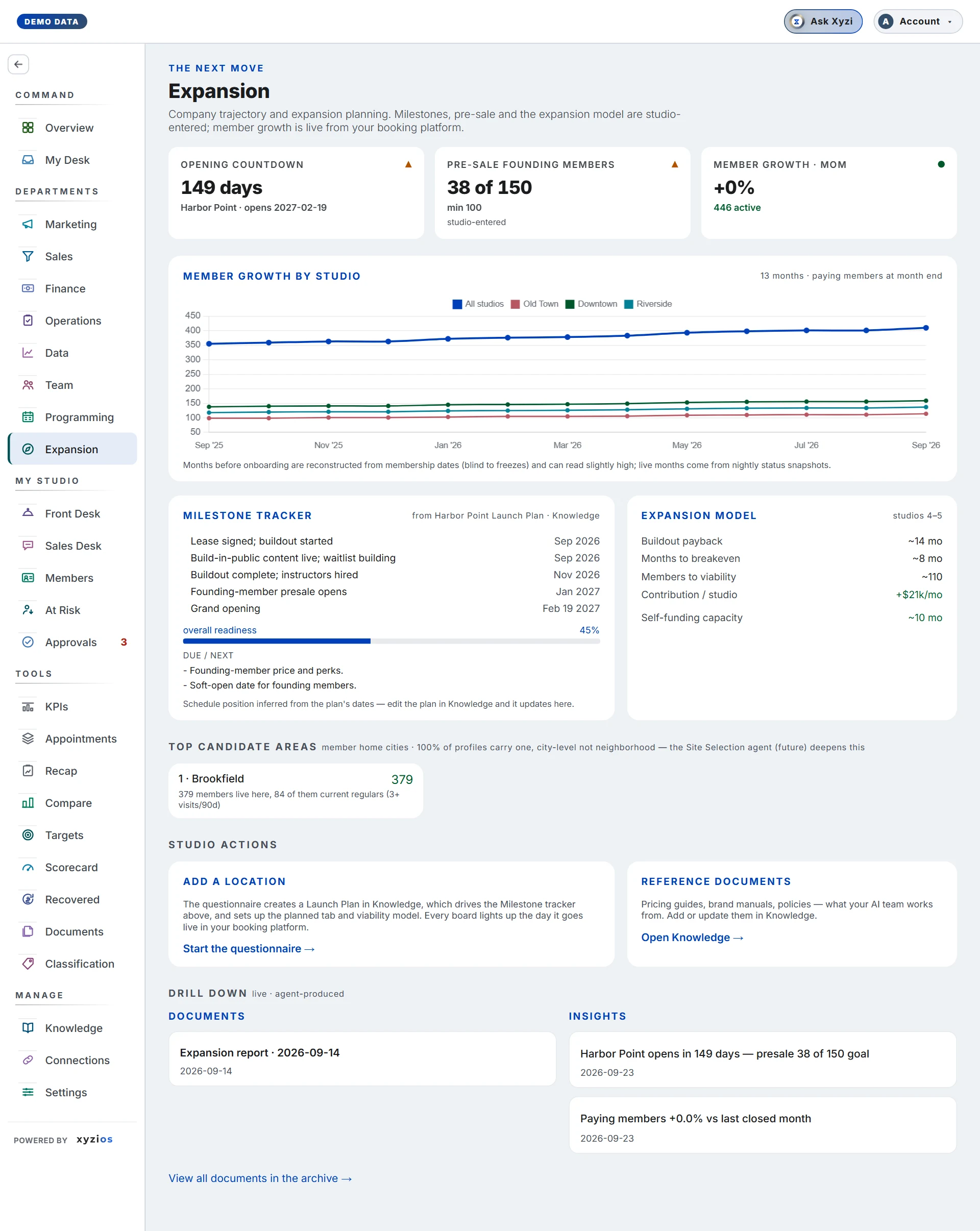

What this board answers
Where is the company heading, and is the next room on track? It reads the whole business for the next move: expansion, pre-sale and the big bets. Member growth is live from the booking platform; milestones, pre-sale goals and the expansion model are what the studio has entered. For owners and Directors; a Location Manager never sees this board.
How to read it
Three cards:
- 1Opening countdown: days to the next planned location’s target open date, with its name.
- 2Pre-sale founding members: signed founding memberships against the goal you set, with the pace note (“needs N a day”). Green is on pace, amber is behind. When a location is in presale the card reads the Presale board’s tracker and opens it on tap; otherwise it shows what the studio entered by hand.
- 3Member growth · MoM: paying members at the end of the last closed month against the month before, with the active count.
4Member growth by studio charts paying members at month end for each site over the last 12 months. Months before the studio joined Xyzios are reconstructed from membership dates and can read slightly high; live months come from nightly snapshots.
5Milestone tracker lists the milestones of the Launch Plan document in Knowledge, each marked done, in progress, due, overdue or upcoming from its date, with overall readiness, the waitlist against its goal, On pace or Behind pace, and the next actions due. With no plan on file the panel says so and points at the questionnaire.
6Expansion model holds the studio’s own figures for the next rooms: Buildout payback, Months to breakeven, Members to viability, Contribution / studio and Self-funding capacity. Dashes mean nothing entered yet.
Top candidate areas is empty until the Site Selection agent exists; it says so rather than guessing.
Studio actions at the foot: 7Add a location and Reference documents.
What to do here
- To start a new room, tap Start the questionnaire → under Add a location. Give the location name, neighbourhood, target open date, build-out budget, target members at viability, a milestone timeline (one per line, “When - Milestone”) and any open decisions, then Create the plan. It writes a Launch Plan in Knowledge, which drives the Milestone tracker, and sets up the planned location.
- To move a milestone, edit the Launch Plan in Knowledge; the tracker follows its dates on the next refresh.
- When the room starts selling, set its stage to presale in Studio Setup and its daily goal under Settings › Presale. The Pre-sale founding members card and the Presale board come alive together.
- Put pricing guides, brand manuals and policies in Knowledge via Open Knowledge →; they are what the AI team works from.
- ✦ Ask Xyzi in the top bar to question a figure; ◎ Report for a written summary.
Common questions
Opening countdown is a dash.
No planned location has a target open date. Add one through the questionnaire, or set the date on the location in Studio Setup.
Pre-sale founding members is a dash.
No location is in presale, or no founding goal is set. Set the stage in Studio Setup and the goal under Settings › Presale.
Member growth here disagrees with New members on Sales.
Growth is net: paying members at month end against the month before, so cancellations count against it. Sales counts joins only.
The milestone tracker shows no plan.
Add a Knowledge document titled “… Launch Plan” with a When | Milestone table, or run the questionnaire, which writes one for you.
A milestone shows overdue that we finished.
Status is inferred from the plan’s dates. Edit the row in the Launch Plan and the tracker updates.
Who sees this board?
Owners and Directors. Location Managers, front desk and instructors do not.