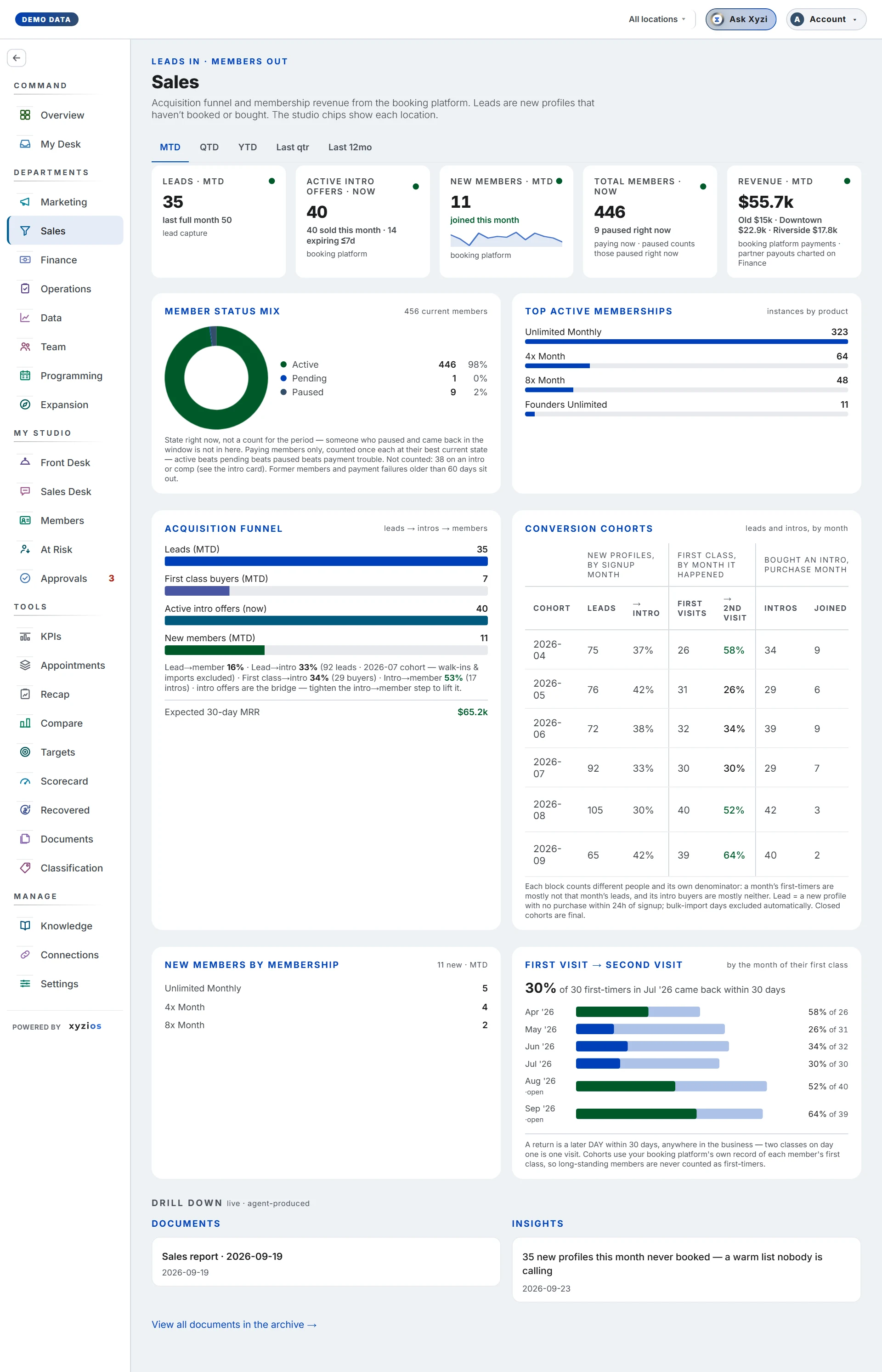

What this board answers
How well are we turning strangers into members, and what did the shop sell? Leads, intro offers, new members and revenue from the booking platform, with the funnel and its monthly cohorts underneath, then retail by shelf. For owners, Directors and Location Managers; the Sales Desk is where the calls happen, this is where you judge the month.
How to read it
Period picks the window from the standard list, each with its dates, in three groups: To date (Week to date, Month to date, Quarter to date, Year to date), Previous, a whole period that ended (Previous week, Sunday to Saturday, Previous month, Previous quarter, Previous year), and Rolling, up to today (Last 30 days, Last 90 days, Last 6 months, Last 12 months). It opens on Month to date. Previous month is the calendar month before this one, whole, so its figures are final. Every card that counts a flow takes the window and says so in its label. Active intro offers is a balance: it says · now and ignores the window. Total members is a balance too, and answers a window of whole months with the month-end count on record; on a window that cuts a month, such as a week or the last 30 days, it shows the count now.
The company cards:
- 1Leads · MTD: new profiles, as your studio counts leads in Studio Setup (all new profiles, or only those who didn’t buy when their account was set up). The previous month beneath; on Prev mo, the month before it.
- 2Active intro offers · now: trials open right now, with how many were sold this month and how many expire within 5 days. The expiring count is intros whose buyer has taken a class and has not joined, the people on the Intro expiring list on Call Lists. An intro bought and never used past its own window is not counted; it is on Intro bought, not started yet on Call Lists.
- 3New members · MTD: joined in the window, renewals excluded. At a Mariana Tek studio a member who cancels one plan and takes another has changed plan and is not counted as new.
- 4Total members · now: paying members, with how many are paused and the change in pauses since the last closed month. On MTD, QTD and YTD the figure is the count now, and the line under it says what the count was when the window opened (the end of the month before it) and the change since. On Prev mo, Prev qtr and Last 12mo the label names the month the window ended in (Total members · end of Sep), the figure is the count recorded at that month end, and the count now is on the line under it. A month end with no count on record shows — and says the close was not recorded.
- 5Revenue · MTD: booking platform payments; each location’s part is in Revenue by location below. Partner payouts are charted on Finance, not here. Last 12 months runs from the same day a year ago to today. If your booking platform’s orders start partway through the window you pick, the label names the day they start (Revenue · from that date) instead of the window, because the figure covers only that span.
Revenue by location sits under the cards on All locations: a bar for each location over the window the Revenue card names, with its revenue and its share of the company’s, biggest first. An order that names no location is in the company’s figure and in no bar, so the bars can add up to less. A location’s own tab shows its share on its Revenue card instead.
Members by month draws the same count over thirteen months: twelve month ends, then this month so far, dotted. The months of the window you picked are in full colour and the rest are dimmed, so the chart moves with the tabs. It is one line, for the company or for the site you are on, and never the sites stacked: a member with memberships at two sites counts at each, and one with no location on file at none, so the sites do not add up to the company. Where a site’s month ends were placed by an earlier rule the line stops and starts again, because the step between them is not growth.
Class packs sold sits under the members chart: the number of class pack orders in the window you picked, and how many of each pack type, biggest first (types past the first eight fold under more types, and a studio with a long list sees the smallest as one Other pack types row). It is a count and a split, not a list of who bought; the booking platform has the sales. One order is one pack. The company figure adds every pack sold at any site, online sales included, so it can be more than the location tabs add up to, and on MTD it is the Sales Desk’s Class packs count for the month. The panel is there only for a studio that has a product classified as a class pack; a studio that sells none is not shown a zero.
Win-back offers sits under it, for a studio that has ticked Win-back offer on a product (Classification, Products, behind the row’s ⋯): the people who bought one in the window you picked, by offer, and how many of them have joined since. Joined means counted as a new member on or after the day they bought the offer, by the same rule as New members, so a renewal is not joining and someone coming back is. A person counts once an offer a month. It is a count, not a list of who bought: the Sales Desk’s Win-back offer in progress lists the buyers who have not joined yet. A studio with no win-back offer ticked is not shown the panel.
6Member status mix is a ring of current members by state (Active, Pending, Paused, Payment failure); it is a snapshot, not a count for the period, and people on an intro sit outside it. Top active memberships ranks products by live instances.
7Acquisition funnel draws Leads, First class buyers where the studio sells one (First visits where its first step is a visit), Active intro offers (now) and New members, with lead → member, lead → intro, sign-up → first class (sign-up → first visit), first class → intro (first visit → intro) and intro → member rates, and Expected 30-day MRR at the foot.
8Conversion cohorts charts one step at a time, picked by its tabs: Lead → intro, Intro → member, Lead → member and First visit → 2nd visit. Each bar is a month’s rate, and under it are the two counts it is made of, such as that month’s leads and how many of them bought an intro. The tabs count different people: leads by signup month, intros by the month the buyer took their first class after buying (an intro nobody has used yet is in no month; a studio whose intros run from the day they are sold has them by purchase month), first visits by the month they happened. A dashed bar is a month still maturing, which can only rise; a solid bar is closed and final.
Lead, Book, Show, Convert card. With Sign-up to membership card on the Sales board on in Settings › Features, a full-width card under the first row of cards follows new people from sign-up to membership, over the window the tabs pick. It has four tiles, one for each step. Each tile shows how many people took that step in the window and, under it, how many took it in the window before: the previous month for month to date, the previous quarter for quarter to date, the month or quarter before for a closed one. The other windows (week to date, year to date, the previous week and year, and the rolling ones) have no line under them. A green ▲ means the window is ahead of the one before, and a red ▼ means it is behind. While a window is still running, that is against the earlier window’s pace: on month to date, the previous month’s pace (its count spread over its days, up to today’s date), and on quarter to date, the previous quarter’s. Between two tiles is the rate: the second step’s count as a share of the first’s. Each step counts people, each once, on the day they took the step, judged from their whole history with your studio:
- Lead: everyone who signed up in the window. Partner-app customers and gift-card buyers are not counted.
- Book: people whose first booking ever fell in the window, for a class or an appointment, whether they came, missed it, cancelled late or are still booked. A cancel in time, a class you cancelled, and a session that is not a class (a workshop, a teacher training) are not bookings.
- Show: people whose first visit ever, a class or an appointment, was in the window.
- Convert: people who bought a membership or a paid-in-full pass on the day of that first visit or within your lead conversion window after it (30 days unless you changed it).
Under Show and Convert, a bar splits the step by how each person came in, and the line under it gives the counts, which add up to the step: intro (an intro pass), first class (a first-class offer, or a product you count as a first visit), trial (a trial class), consult (a new-client consult) and other (a drop-in, a pack, a membership or anything else). Only the ways somebody came in are listed. Each step is dated by its own day, and Convert by the purchase, so a rate can pass 100% early in a month: someone who came in the previous month and joined this week is in this month’s Convert and the previous month’s Show. That is also why the card will not match the Marketing board’s funnel, which follows each month’s sign-ups forward.
Partner-app customers, such as people who book through ClassPass or Wellhub, are in none of the four steps, even if your studio counts them as leads elsewhere. They have their own line under the tiles: Partner apps: N first visits · M joined, where N is how many of them came for the first time in the window and M is how many of those bought a membership or paid in full within your lead conversion window. The line is shown only when there are some. Staff accounts are left out of Book, Show and Convert.
On a location tab the card counts that location. If you manage some of the locations, All is your locations added up. If the counts could not be loaded, the card says so instead of showing zeros. To switch it off, turn off Sign-up to membership card on the Sales board in Settings › Features.
New members by membership lists the plans joined this window. First visit → second visit shows the share of first-timers who came back within 30 days, by the month of their first class.
Direct, near the foot of the board just above Retail, counts new people who bought within a day of signing up, like a walk-in or someone who bought straight away online, over the window the tabs pick, with last full month’s count under it; on Prev mo, the month before it. Bought on day one shows the five products they bought most, then everything else. Whether Leads includes them is your studio’s setting in Studio Setup, and the card’s info button says which.
Pick a location and the cards read for that site: leads by member home location, intros with the site’s own conversion rate (measured on intros from 30 to 90 days ago, so it stays the same whichever window you pick), Members as the site’s paying members, read like the company card from the site’s own month-end counts, and revenue with its share of the company over the same window; Class packs sold counts that site’s own orders. On MTD, New members is set against the previous month; on any other window each card’s line says what the window holds instead. If you manage one location you see only that site’s tab.
Retail is the shop, by shelf, for the window above. Retail is kept by the month, so a window that cuts a month shows the whole-month window it sits in and is named as that window: Week to date and Last 30 days show Month to date, Last 90 days the previous quarter, Last 6 months and Last 12 months the latest six and twelve full months, and Previous week the month it ended in. The shelves are the ones your booking platform files products under: MindBody’s product categories, or on Mariana Tek each retail product’s class, such as Clothing or Food and Beverage. A shelf you have not renamed on Classification shows the platform’s own name. Cash or Accrual sets the basis, the same switch as Finance’s Retail tab. The cards are the window’s retail with its share of all sales (on Cash, the basis every revenue figure uses), how it compares with the period before and with last year, and the Top shelf. The period before is the previous month for MTD, the month before for Prev mo, the same stretch of the previous quarter for QTD, the quarter before for Prev qtr and the twelve months before for Last 12mo; YTD is compared with last year only. This month counts pro rata: retail is kept by the month, so the month it is set against counts for the same days (August’s total times 23/31 on September 23), and the card says so. Retail keeps twenty-five months, so a quarter or a year can be set against the same stretch a year before once your records reach that far back; a comparison that would reach past the months the board holds, or before your sales records begin, shows — with the reason instead of a figure. By shelf gives each shelf this window, the period before, last year and the change; click a shelf to open its ten best sellers for the window, with Everything else on this shelf under them so the rows add up to the shelf. Top products lists the window’s ten best sellers across every shelf, with the same comparisons. A product counts each order it is the first item of, the rule the shelves use. By month charts thirteen months by shelf with this month paler, and on All locations By location sets the sites side by side with each one’s share of its own sales. Not at a location is the online store and orders that name no location, so the sites add up to the company. A change against less than $50 shows in dollars, not as a percentage.
On a location tab, Drill down lists only the documents and insights about that site; the company’s stay on All locations.
What to do here
- Set the window first. A comparison across tabs is only fair between two closed periods.
- Read the funnel from the bottom: if intro → member is healthy, the problem is upstream; if it is not, the fix is in how intros are followed up, and the names are on Call Lists.
- Open Conversion cohorts and read the solid bars. A dashed month is still maturing; ignore it until it closes.
- Check Active intro offers · now for how many expire within 5 days; those people are the intro follow-ups on Call Lists.
- Tap ✦ Ask Xyzi in the top bar for a specific number.
Common questions
A planned location shows a pre-opening page.
It has not sold anything yet. A presale location keeps its tab: its founding sales count here like any other sale.
Lead → member is 2%. Is something broken?
No. Most leads never book. Read intro → member for how well the studio sells; that number is usually 15–30%.
My locations do not add up to the company total.
Members with no home location on the booking platform count for the company and for no site. The gap is disclosed, not hidden. In Retail, the same gap is the Not at a location row.
Why does retail say pro rata?
Retail is kept by the month, not by the day, so the first 23 days of September can only be set against the same share of August. It is an estimate for this month only; closed months compare exactly.
I manage several locations. What is my All?
Your locations added up. The company’s retail is not part of your view.
Why is so much of a shelf under Everything else?
Each size and colour is its own product on the booking platform, so a shelf of clothing spreads over hundreds of names. The ten listed are the ten biggest; the rest are counted in that row, not dropped.
Revenue says “from” a date instead of the window.
The booking platform’s orders start partway through the window you picked, so the figure covers only the part of the window from that date on, and the label says so rather than calling it the whole window. Once the window starts after that date, the label goes back to the window’s name.
Leads here differ from my platform’s lead report.
The platform counts inquiries. Xyzios counts profiles created in the window, by your studio’s definition of a lead in Studio Setup (all new profiles, or only those who didn’t buy when their account was set up), excluding partner and gift-card buyers and bulk-import days.
Why does Active intro offers ignore the period tab?
It is a balance, what is open today, so a window has no meaning for it.
A location’s member card shows a month end with no change beside it.
That month end placed memberships the booking platform lists with no sale location by an earlier rule than today’s count uses, so part of the difference between the two is the rule, not members joining or leaving. The card shows the month-end count and says so in its footnote, and shows a change again once a month closes under today’s rule. The company’s count is not affected.
The footnote says a month end was rebuilt from membership dates.
That month is from before Xyzios began recording your counts each night, so it was worked out from each membership’s start and end dates. It is close, not exact: it cannot see every pause.
Why does Retail say Month to date when I picked Last 30 days?
Retail is kept by the month, so a window that cuts a month shows the whole-month window it sits in, and its label says which. Every other card on the board counts the window you picked, day by day.
Where are ad spend and cost per lead?
On Marketing. This board deliberately carries no spend.