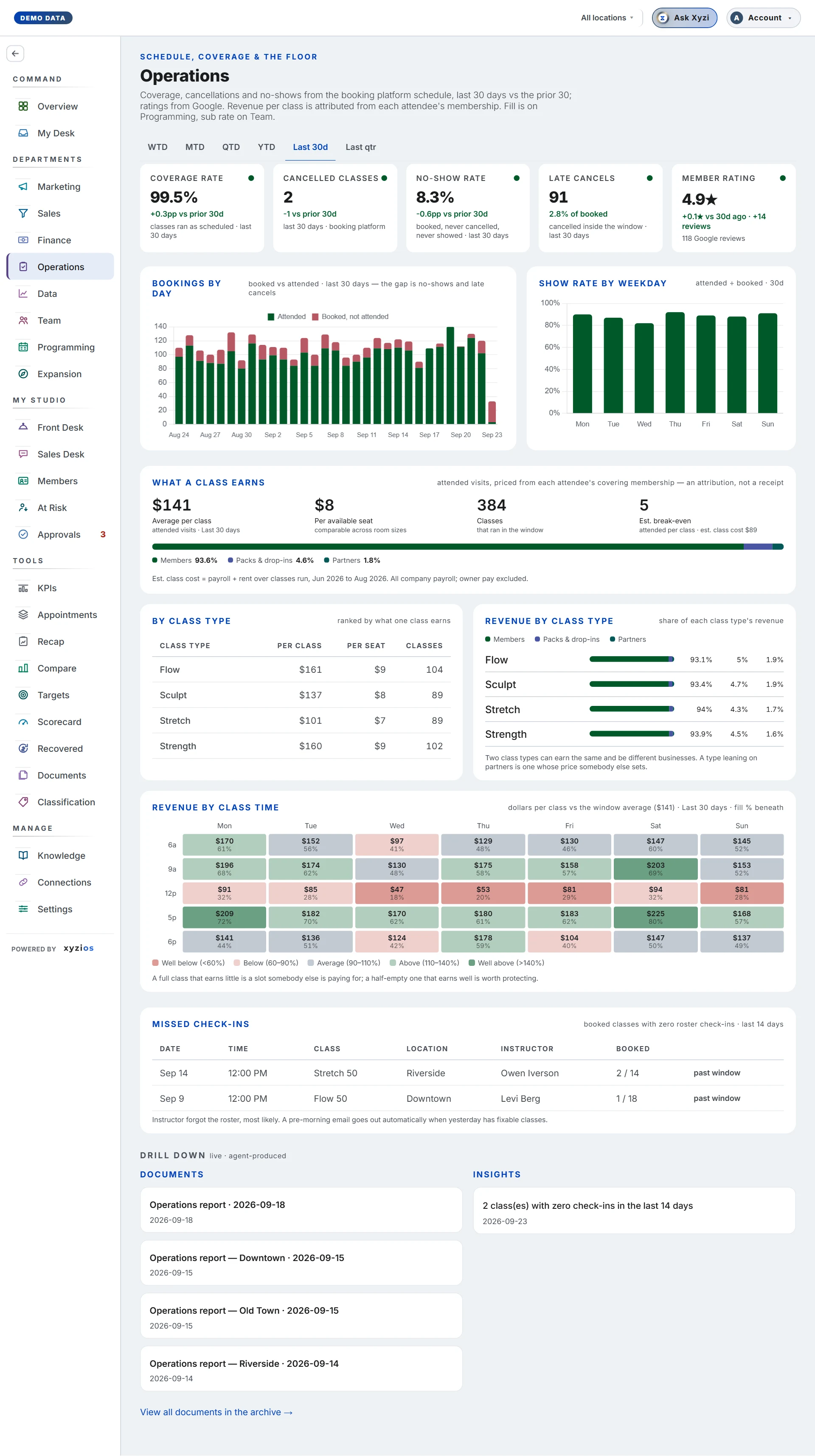

What this board answers
Did the schedule happen as promised, and did the people who booked turn up? Coverage, cancellations, no-shows and late cancels from the booking platform schedule, plus the studio’s Google rating. The board opens on Month to date; Period under the title picks another window. Fill lives on Programming and sub rate on Team; this board owns execution.
How to read it
Period picks the window from the standard list, in three groups, each with its dates: To date (Week to date, Month to date, Quarter to date, Year to date), Previous, a whole period that ended (Previous week, Sunday to Saturday, Previous month, Previous quarter, Previous year), and Rolling, up to today (Last 30 days, Last 90 days, Last 6 months, Last 12 months). A Previous window, or a long rolling one, is offered only when the schedule holds it whole. The four schedule cards and everything under What a class earns answer for the chosen window; Bookings by day and Missed check-ins keep their own windows and say so. The trend against the prior 30 days shows on Last 30 days only.
Five cards. On Last 30 days the first four show their trend against the prior 30 days beneath them; on Late cancels it follows the share. For cancellations and no-shows, down is the good direction and the colours follow.
- 1Coverage rate: classes that ran as scheduled, as a share of what was scheduled.
- 2Cancelled classes: sessions the studio cancelled in the window.
- 3No-show rate: booked, never cancelled, never showed, as a share of attended, late cancels and no-shows together.
- 4Late cancels: how many cancelled inside the platform’s window, with their share beneath, of the same base the no-show rate uses: attended, late cancels and no-shows.
- 5Member rating: your Google rating and review count, with the change against 30 days ago.
6Bookings by day stacks who came against who did not show for the last 30 days. Show rate by weekday beside it is who came out of who was still booked when the class began (who came plus the no-shows), by day of the week; a late cancel told you, and is in neither.
7What a class earns prices each attended visit from the attendee’s membership: Average per class, Per available seat (comparable across room sizes), and Classes in the window. Beside them a small grid colours each slot by what it earns against the window’s average, with the slot that earns most and least. Open Schedule has the full grid with fill beneath every slot and the visits not priced; Revenue by class type is on Programming.
With the See location costs grant, Est. break-even takes the place of Classes: the attended heads per class that cover its estimated cost. Est. class cost is payroll plus rent over classes run in the last three closed months: instructor pay where a payroll register is connected, otherwise all payroll at the site; rent only, no utilities; owner pay excluded. Where the books do not split payroll and rent by site, one company-wide figure is used and says so. With fewer than two closed months it reads Not enough data, never a number.
Late cancels and no-shows sits under What a class earns: how many of each in the window, how many were penalised and how many waived, how many no-shows had no fee because the booking’s no-show policy charges none, the late-cancel and no-show fees charged, how long before class people cancel, and how many people did it three or more times. Mariana Tek records all of that; MindBody records the counts alone, and the card says which parts your platform does not record. Where your booking platform counts its waitlists, Seats a waitlist could have filled counts the late cancels and no-shows in classes that ended with people still waiting, and, if you can see what a class earns, what those seats were worth at the window’s revenue per visit.
8Missed check-ins lists booked classes from the last 14 days with zero roster check-ins. A row marked fix now is still inside the booking platform’s 24-hour window: check the roster in there and no-show fees never hit. The most likely cause is an instructor who forgot the roster. Classes marked fix now also become one of Xyzi’s tasks on Tasks, one for each site, given to that site’s location managers (a site with none sends it to the Directors, then the owners). It moves up a level if nobody touches it for two days, and Xyzi clears it once those classes have their check-ins.
Pick a location and every card and panel reads for that site alone. If you manage one location you see only that site’s rows.
On a location tab, Drill down lists only the documents and insights about that site; the company’s stay on All locations.
What to do here
- Start with Missed check-ins. Anything marked fix now goes to the instructor or the desk today; a pre-morning email already goes out when yesterday has fixable classes.
- Read Coverage rate and Cancelled classes together. Coverage falling with cancellations rising is a staffing problem; take it to Team’s Fragile slots.
- Read No-show rate and Late cancels by location, then check Show rate by weekday for the day that drags the average.
- Use What a class earns when deciding which slots to keep, and Open Schedule to compare them slot by slot. If partner visits are priced at an estimate, tell Xyzios support what ClassPass and Wellhub actually pay you per visit (Report issue, in your account menu), and it becomes your number.
- Tap ✦ Ask Xyzi in the top bar to ask about a number.
Common questions
No-shows plus late cancels plus attended do not match my platform’s booked count.
Both rates divide by attended plus late cancels plus no-shows, taken from the same visit rows as the numerators, so the three reconcile with each other. The platform’s booked count is a snapshot taken at a different moment.
Member rating is a dash.
Google Business Profile is not connected, or the location’s listing has not been matched yet; connect it on Connections.
A location tab shows a planned or presale page.
The site has not held a class yet, so there is nothing here to measure. The tab fills in at its first attended class.
Missed check-ins says all clear but I know a class had nobody checked in.
The list covers the last 14 days and only classes that had bookings. A class with an empty roster has nothing to check in.
Why is Visits not priced showing?
A partner such as ClassPass sent visits but its per-visit rate never reaches the booking platform. The visit is counted, the money is left out rather than invented.
Where is class fill?
On Programming. Sub rate and who covered what are on Team.